
Cloud MES
Cloud MES, switched on one module at a time
A cloud-based manufacturing execution system you open in a browser, with no server room and no big IT project. Planning, Orders, Quality, IoT, OEE, EMS, Maintenance, Documents, and AI Agents on one data foundation, turned into something every level of the organization can act on.
What modular means
- 1
- Module is a valid place to start
- 9
- Modules on the same data foundation
- 0
- Re-entry between them
Nobody needs a whole MES on day one
The classic MES is an all-or-nothing project: eighteen months, every process at once, and a scope nobody on the floor recognizes by the end of it. A modular MES is the opposite. Start with the module that answers the question you have this quarter, whether that is orders, the plan, machine and workstation data, or OEE, and add the next one when the next question turns up. Every module you add reads the data the earlier ones already collect.
What is a cloud MES?
A cloud MES (cloud-based manufacturing execution system) is software for running production that lives in the cloud and is used through a browser. It connects machines, workstations, orders, and people on the floor, and it can exchange data with the ERP and SCADA you already have. It is delivered as SaaS, so the vendor runs the servers, updates, and backups.
Cloud vs on-premise MES
An on-premise MES runs on your own servers: hardware to buy, a team to maintain it, and upgrades as projects of their own. A cloud MES is a subscription: it is up in weeks, updates itself, and scales by adding machines or modules instead of servers. On-premise still makes sense where a plant cannot reach the internet at all. For most small and mid-sized plants, cloud is the faster, cheaper route.
The modules a cloud MES is made of
Planning
Sequence work orders across the entities of each production route, on a timeline the floor can see, against the capacity the machines and workstations actually have.
Orders
The orders to run, on the panel at the machine or workstation. Start, stop, and report quantities and scrap where the work happens, with or without an ERP behind it.
Quality
Digital checks and deviations registered where the work happens, traced back to machine or workstation, batch, and shift.
IoT
Connect new controls, retrofitted sensors, and the systems you already run. Read machine state, and control start, stop, and setup from the panel.
OEE
Track availability, performance, and quality across every machine or workstation, line, and shift. Understand exactly where production time is gained and lost.
EMS
Energy consumption measured per machine and held up against what it produced, so waste shows up as kWh per unit.
Maintenance (CMMS)
Preventive and predictive maintenance triggered by running hours and machine condition instead of the calendar.
Documents
Work instructions, drawings, and certificates at the machine or workstation, always in the version that applies to the job.
AI Agents
Agents and copilots that answer questions in plain language and watch for patterns in your own production data.
From order to finished parts
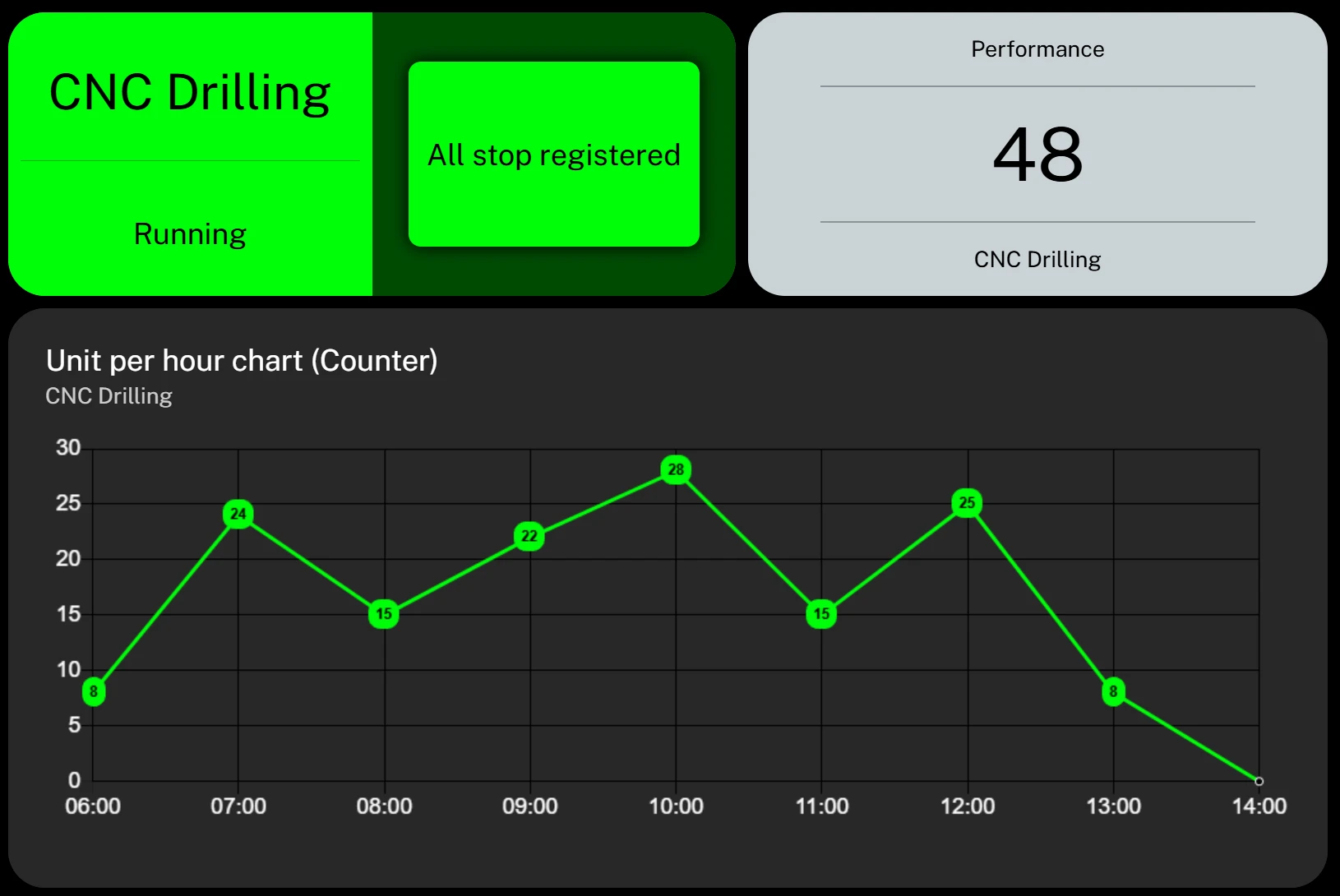
The counter next to the machine
The panel shows the machine's state, the part counter and parts per hour through the shift. The operator sees at a glance whether the order keeps pace.
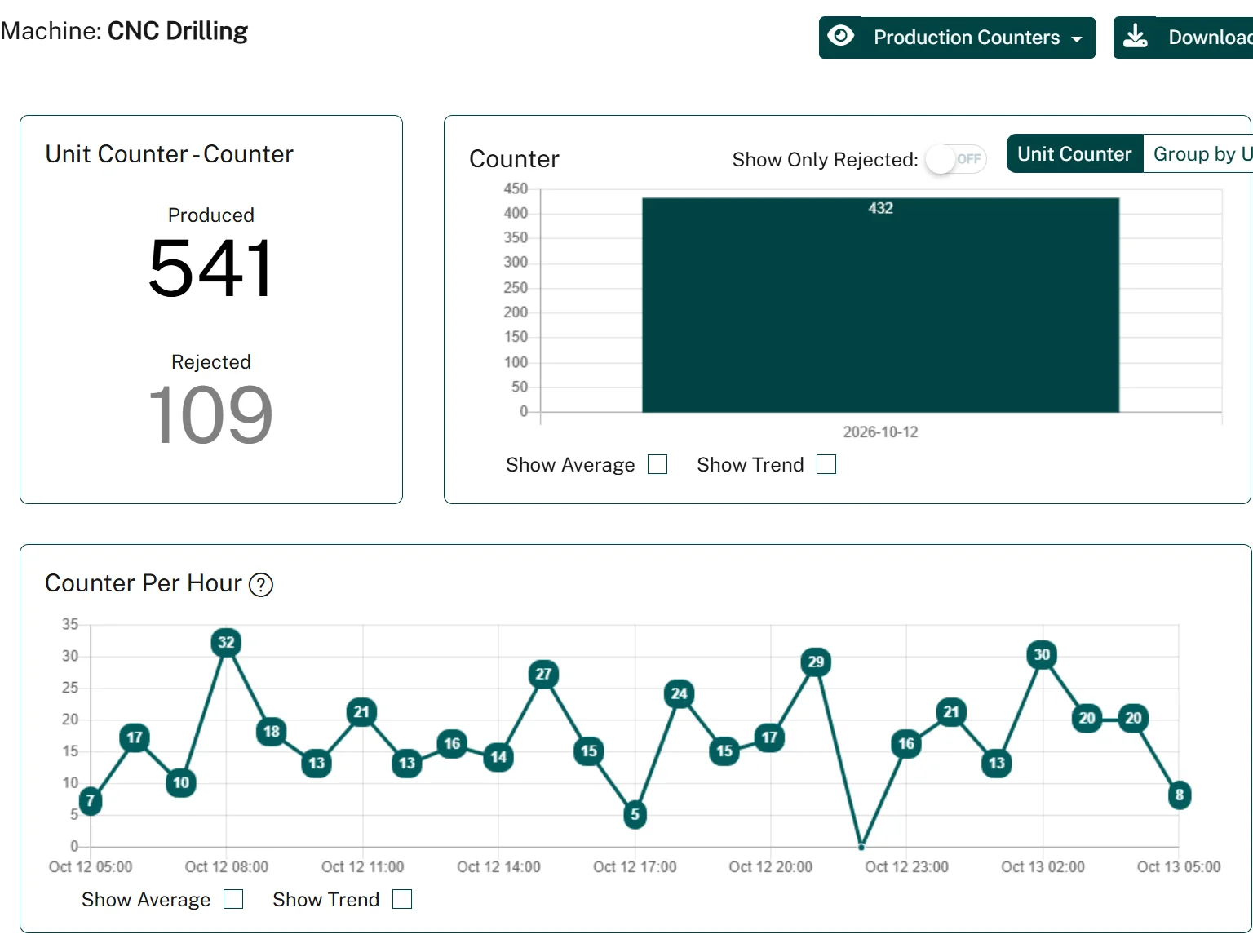
Produced and rejected, day by day
The counter report adds up good and rejected parts per day, shift or hour for any period, with average and trend lines when you need them.
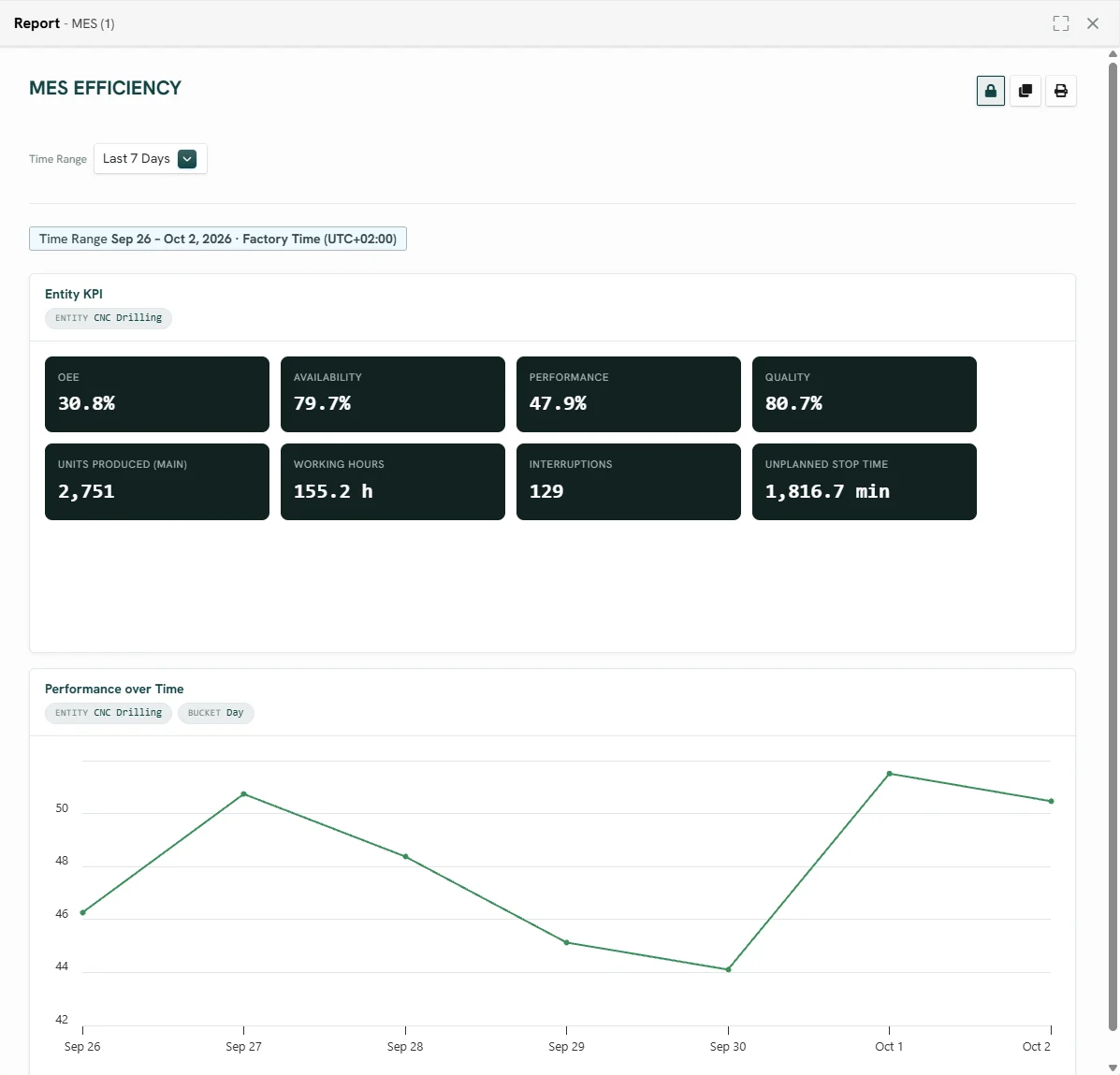
The week in eight numbers
OEE, availability, performance, quality, parts produced, working hours, interruptions and unplanned stop time for one machine, with the trend underneath.
How it works
- 01
Start with one
Pick the module that answers the question you have now. Machines, sensors, and existing systems get connected as that module needs them, with no rip-and-replace.
- 02
Add the next
The next module switches on against data you are already collecting, so it arrives with history behind it instead of an empty database.
- 03
Keep one version of the truth
However many modules end up running, there is one record per machine or workstation, order, batch, and shift, and every view reads from it.
Rolling out a cloud MES in a small plant
No eighteen-month project. A small plant can have its first machine reporting in days and a full picture in a few months.
New to the idea? Read the plain explainer: cloud based manufacturing execution system.
- 01
Pick one question
Where do we lose time? Which orders are late? Choose the one question that matters this quarter, and the module that answers it.
- 02
Connect the first machines
Start with the two or three machines that matter most. Existing controls, retrofitted sensors, or a manual panel all work, with no rip-and-replace.
- 03
Put the panel at the machine
Operators start jobs, report quantities, and register stop causes on the panel where the work happens. Training is minutes, not days.
- 04
Read the first weeks
After a couple of weeks the data shows the biggest losses. Fix the largest one and measure that it moved.
- 05
Add machines, then the next module
Roll out to the rest of the plant, then switch on planning, quality, or energy against data you already hold. Link the ERP when it earns its keep.
Product view
One module registers it, every module has it
This is what makes it modular rather than nine separate products: a stop registered at the machine or workstation lands once, and orders, OEE, maintenance, and the monthly report all read the same record.
OEE
Availability -1.4%
Maintenance
Task created
Planning
Plan moved 20 min
Modules on this line
Landing today