
Insights
How to choose an OEE system for your production
by OptiPeople Team
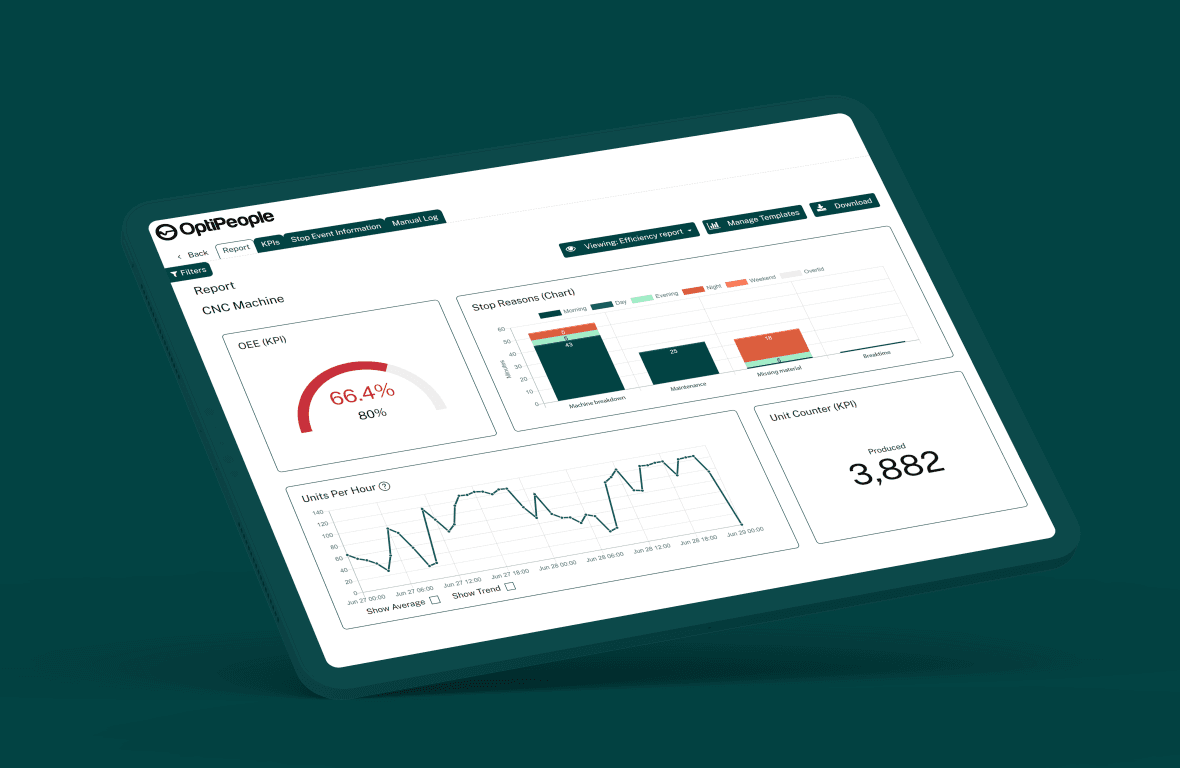
An OEE system measures how much of your planned production time makes good parts, and shows where the rest goes. Whether it works on the shop floor comes down to a few things: data straight from the machines, older ones included, operators giving each stop a cause at the machine, and starting on one line without a big IT project.
What is an OEE system?
An OEE system, or OEE software, collects data from production and calculates OEE: availability x performance x quality. The number shows how far you are from perfect production. The three factors show whether time is lost to stops, to slow running or to scrap. If you want the number itself first, start with what OEE is and how to calculate it.
The difference between a spreadsheet and an OEE system is where the numbers come from and when you see them. In a spreadsheet they are typed in afterwards. In an OEE system they come from the machine while the shift is running, so there is still time to act.
What should an OEE system do?
Most vendors have a long feature list. These are the points that decide whether the system is still in use once the novelty wears off.
Collect data straight from the machines. Run time, stops and part counts should come from the machine, not from a sheet of paper. That goes for the older machines too. Ask whether the system can read from the PLCs you already have, and what happens with a machine that has nothing to read from. Often a small sensor or a part counter is enough.
Let operators register the stop cause at the machine. A machine can tell you it has stopped. It cannot tell you why. The operator can, if it takes a few seconds and the list of causes fits that machine. Without stop causes you have a number but no explanation. How to build that list is covered in the guide to stop registration and stop causes.
Show it live per shift and per line. The numbers should be on a screen at the line and in the office while the shift is running. If you only see them the next day, the chance to act has passed.
Produce the reports on its own. Daily, weekly and monthly reports should arrive without anyone building them. Time spent assembling numbers in a spreadsheet is time not spent improving anything.
Connect to your other systems. If your orders live in an ERP, it helps when orders and item numbers can be tied to the OEE figures. But it should not be a requirement for getting started.
Get started without a big IT project. If you need a new server, a six-month project and a full-time consultant before you see the first number, it is too much to start with.
Start on one line. The best first step is a single line or machine where the losses are largest. You quickly learn whether the numbers are right and whether the operators use it.
Manual registration or automatic data collection?
Many plants start with a whiteboard, a shift sheet or a spreadsheet. It is better than nothing, and it gets people talking about losses. But the numbers usually come out too good. Short stops and slow running are rarely written down, and stops end up afterwards in a vague category such as "other".
Automatic data collection means the machine itself reports when it runs, when it stops and when it makes a part. The operator only adds the cause of the stop. That gives you both the accurate number and the explanation. The best setup is a mix: the machine supplies the time and the count, the operator supplies the reason.
| Whiteboard or spreadsheet | Standalone OEE tool | Modular platform (MES) | |
|---|---|---|---|
| Where the data comes from | Typed in by hand | From the machines | From the machines and your other systems |
| Stop causes | Written down afterwards, if someone remembers | At the machine | At the machine |
| When you see the numbers | After the shift or the week | Live | Live |
| Minor stops and slow running | Rarely captured | Captured | Captured |
| Orders, quality and maintenance | Separate | Usually not included | Can be added when you are ready |
| What it takes to start | Nothing | One line and a connection | One line and a connection |
| When you want more than OEE | A new tool | Often another system alongside | One more module on the same data |
The last row is worth thinking about from the start. Most plants that begin with OEE later want a handle on orders, quality, maintenance or energy too. If that sits on the same data, you avoid connecting yet another system.
How much does an OEE system cost?
The price depends less on the software itself and more on what it takes to get data out of your machines. These are the things that push the cost up or down:
- Number of machines and lines. Most systems are priced by how much you connect.
- How the machines are connected. If the system can read from the PLCs and systems you already have, it costs less than fitting new hardware to every machine.
- Hardware. Screens or tablets at the machines, and sensors where there is nothing to read from.
- Setup and training. Stop causes have to be set up per machine, and operators need to know why they register them.
- Integration. A link to an ERP or other systems takes time, so add it when it pays for itself.
- Running costs. A cloud system is usually paid for as you go. A system on your own server needs someone to look after the server.
Then do the sum the other way round. What is one percent more availability worth on your bottleneck? Our figures from 191 machines show how quickly downtime adds up. Ask the vendor for a price that starts on one line, so you can see the value before you go further.
How long does it take to get started?
It depends on the machines, but it should not take months. Where there is a ready-made connector for the controller (Siemens, Fanuc, Mitsubishi, OPC-UA, MQTT and more), most machines are online in hours, not weeks. First we map what already reports something: PLCs, sensors, systems. Then we connect what is there and only add new hardware where there is nothing to read from. That is the job of the IoT module.
Most of the work is not the technology. It is agreeing on the stop causes and building the numbers into daily routines: the board meeting, the shift handover and the improvement work. Dansk Træemballage started on one line, let operators follow uptime on a tablet and got 5% higher OEE in three months. At Glaseksperten, one machine gained up to 30% more uptime once the operators could see it.
Questions to ask the vendor
Take this list to the demo. The answers tell you more than a feature list.
- Can you collect data from our machines, including the oldest ones? How, and what hardware does it take?
- Can you read from the PLCs and systems we already have, or does every machine need something new?
- How does an operator register a stop, and how long does it take?
- Can we build the list of stop causes per machine ourselves and change it later?
- Can we see OEE live per machine, line and shift, and compare shifts?
- How are availability, performance and quality calculated, and where does the ideal cycle time come from?
- Do the reports arrive on their own, and can we choose who gets them?
- Can the system talk to our ERP, and does it have to before we can start?
- Can we start on one line and expand later without starting over?
- Who owns the data, and can we get it out again?
- What else can the system do when we want more than OEE: orders, quality, maintenance, energy?
- Who supports us once we are live, and do they speak our language?
Where to go from here
Pick the line where you think the losses are largest. Connect it, let the operators register stop causes for a couple of weeks, and see what the numbers say. Then you have something to decide on before you expand.
OptiPeople Data Platform collects data straight from the machines and shows availability, performance, quality and OEE live per machine, line and shift. Operators register the stop cause at the machine, and the reports produce themselves. See how it looks in the OEE module, or get in touch if you want to see it on your own production.
FAQ
What is an OEE system?
An OEE system is software that collects data from production and calculates OEE: availability x performance x quality. It shows how much of the planned time makes good parts, and where the rest is lost.
What is the difference between OEE in a spreadsheet and an OEE system?
In a spreadsheet the numbers are typed in by hand afterwards, and short stops and slow running are rarely included. An OEE system collects the numbers straight from the machines while the shift is running, and operators give each stop a cause at the machine.
Can an OEE system work on older machines?
Yes, in most cases. If the machine has a PLC, the system can often read from it. If it has nothing to read from, a sensor or a part counter can measure when it runs and how many parts it makes.
How much does an OEE system cost?
It depends on how many machines you connect, how they are connected, how much hardware is needed and whether you want an ERP integration. Start on one line so you can see the value before you expand.
Do we need an ERP system to use an OEE system?
No. An OEE system can run on its own. An ERP link helps when orders and item numbers need to be tied to the numbers, but it can come later.
How quickly can we see the first numbers?
Once a machine is connected, you see its numbers live straight away. Where a ready-made connector fits the machine's controller, connecting it usually takes hours, not weeks. What takes time is settling the stop causes and building the numbers into daily management.